
A large European bank was stuck in the middle of a migration from SAS Marketing Automation (MA) to SAS Customer Intelligence 360 (CI360). Email was already live in CI360. Four other channels — SMS, Mobile App, Call Center, Branch — were still running on MA. Nobody had a clear answer for how to move them over. Most of the bank's customer communication was frozen in a legacy system while a brand-new platform sat half-idle next to it.
That's not an edge case. It's what a mid-migration usually looks like.
Migrating from SAS Marketing Automation to CI360 isn't a lift-and-shift — it's a move from a server-based solution to a cloud ecosystem, and the traps along the way are easy to underestimate. SAS has built real tooling to smooth the path: the Direct Marketing agent, an automated migration utility, native integration support. For a straightforward cloud setup, that tooling works well. But large enterprises are rarely straightforward.
After many of these projects — across banks, telecoms, and retailers — we've learned exactly where the real work hides. This article is about that.
SAS does provide a migration utility, and it's worth understanding exactly what it does before you plan a project timeline around it. The tool exports MA campaigns using the uploadCampaigns command-line utility, then lets you import them into CI360 as segment maps and direct marketing tasks. Two steps, one purpose: get your campaign logic out of MA and into CI360's data model without redrawing every diagram by hand.
That's the good news. The utility handles the mechanical conversion of Select nodes into Criteria nodes, Communication nodes into direct marketing tasks, and Process nodes into their CI360 equivalents. But "handles" doesn't mean "handles cleanly." Limitations pile up fast: unsupported node types, silent behavior changes, partial rule support, and more (see SAS's own documentation for the full list).
And then there's the part the utility doesn't even attempt: Custom Details, non-standard Post Processing, and any data import that falls outside the scope of your Information Map. Building or updating that Information Map, the piece that defines your subjects, relationships, and custom properties, is entirely on you, done manually before migration even starts.
So think of the utility as scaffolding, not a finished building. It gets segment maps and direct marketing tasks up fast, and it genuinely does save weeks of manual diagram-redrawing. But the real work, the part that determines whether your CI360 environment actually enables all integrations you had in MA, starts the moment the import finishes.
Which raises the obvious question: if the utility only gets you partway there, what does the rest of that "real work" actually look like?
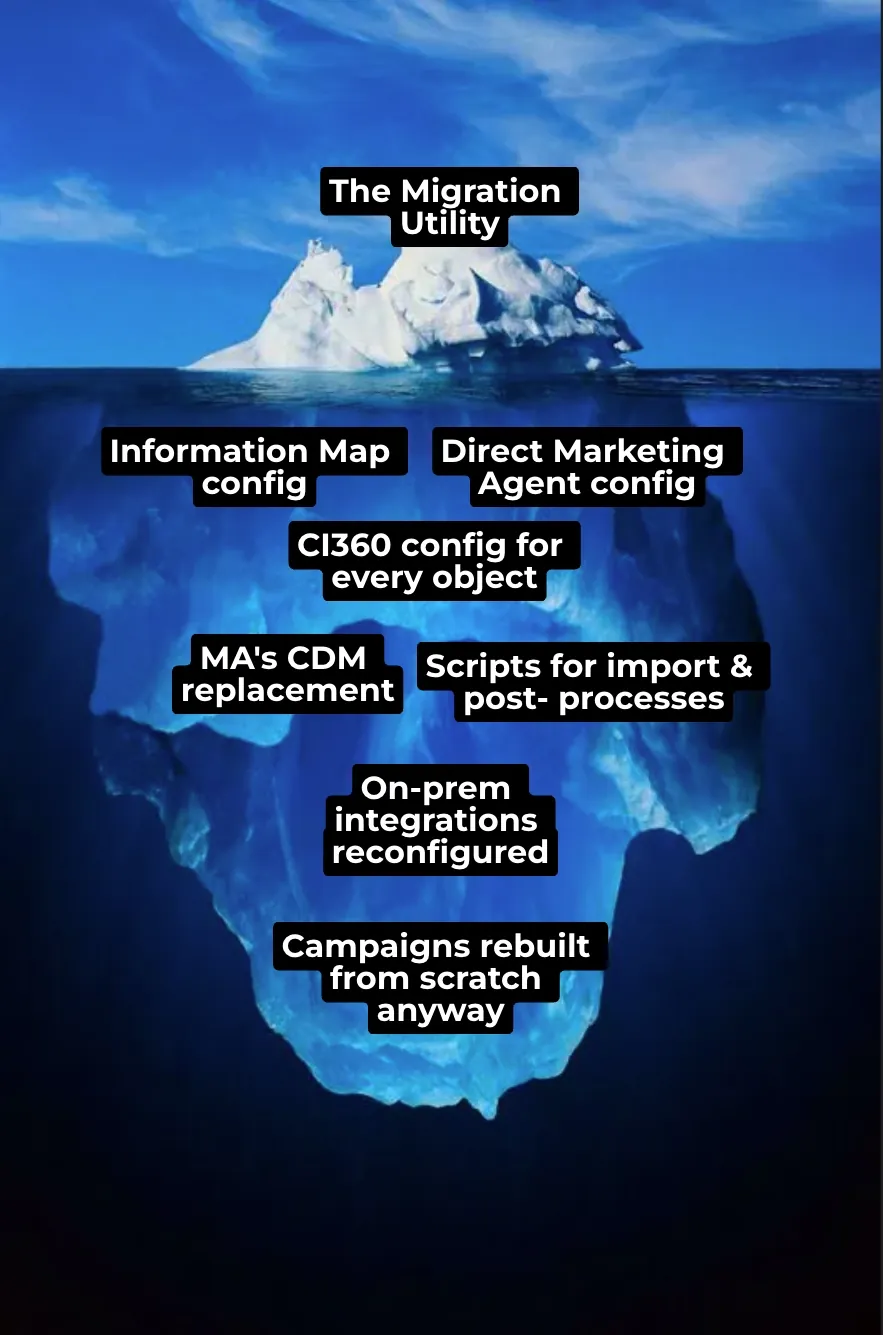
The utility covers the tip of the iceberg. Below the waterline, there's a lot more work, and most of it has to happen before you can even use the tool:
In most of our projects, we barely ended up using the migration utility at all. The original MA tasks were so heavily customized around specific integrations that rebuilding the campaigns from scratch and then reconfiguring each integration step was simply more practical than migrating and patching them afterward.
So no, the utility isn't a magic wand. It can accelerate parts of the journey, but it cannot resolve the architectural, operational and organisational questions that determine whether the migration will actually succeed. In the second part of the article we will examine the five areas we now treat as the real pillars of a successful migration.
Related reading: Debugging SAS CI360 Connector with AWS Lambda, Demystifying SAS Migration, and Beyond CRM to Long-Term Success.