
Picture this scenario: it's Tuesday afternoon. You’re an analyst working on invoice approvals, and you need to find where the approval data lives in SAP. You check the standard documentation – no luck, too many customizations have made it irrelevant. You ping the SAP development team on Teams. One developer responds after 30 minutes. Two calls and several messages later, you finally get an answer. By Thursday.
Meanwhile, the project deadline hasn't moved. And this "simple question" has stalled the work.
We've seen this pattern dozens of times across our client engagements. It's not just SAP – Oracle, Salesforce, custom ERPs – the story is always the same. These questions aren't edge cases – they're a normal part of daily work during report preparation, process analysis, data pipeline development, and ad-hoc analytics requests. And there are dozens of them in every project.
The core challenges remain consistent:
At T1A, we do extensive process analysis and data work – dealing with multiple enterprise systems and their raw data structures daily. We realized that eliminating this friction wasn't just about convenience; it was critical for project success and risk management. So we decided to solve this differently.
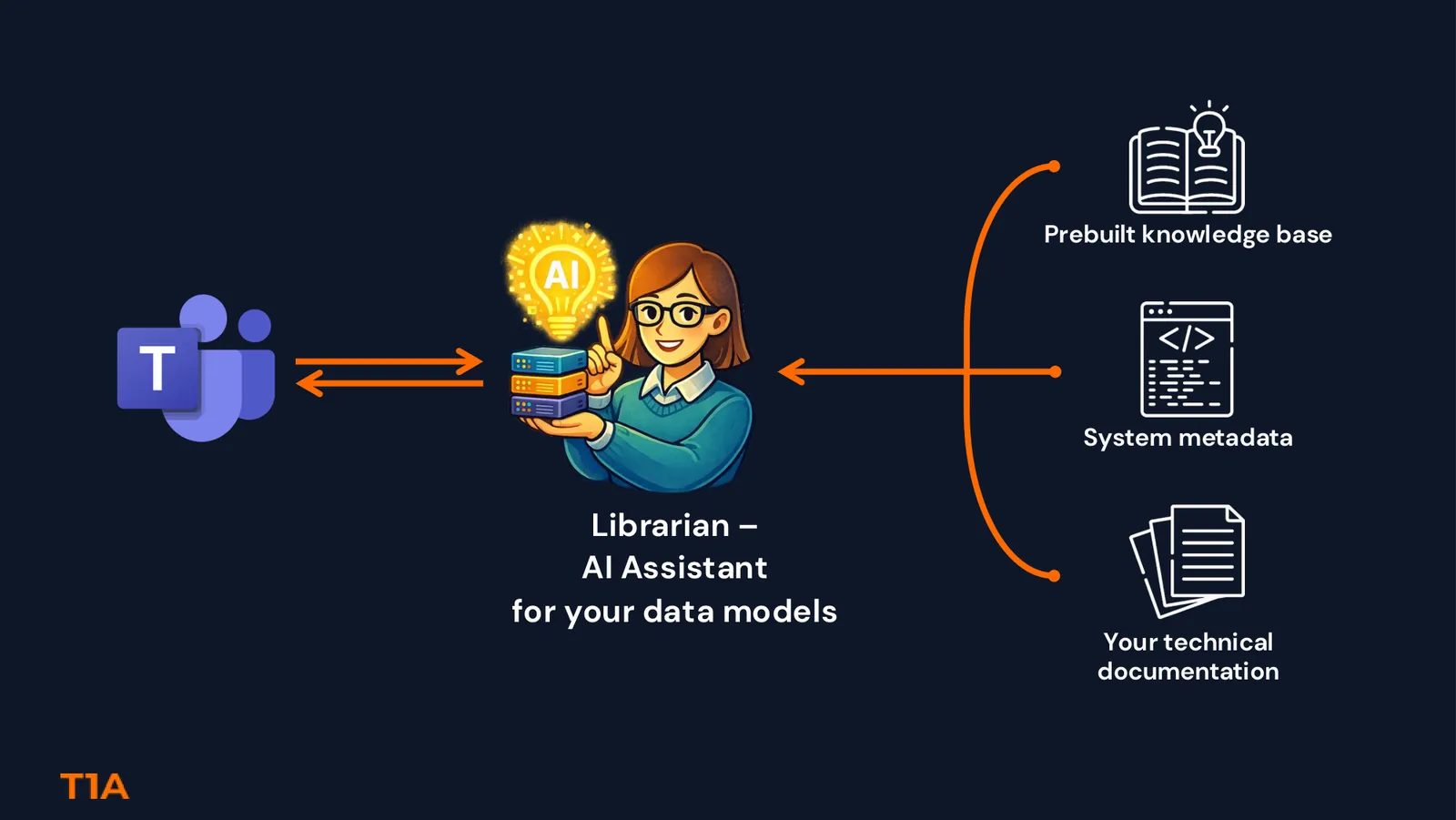
Meet Librarian – our AI-powered assistant for navigating enterprise data models. But here's what makes it different from generic chatbots: it's not trying to guess answers from internet documentation. It knows your specific system.
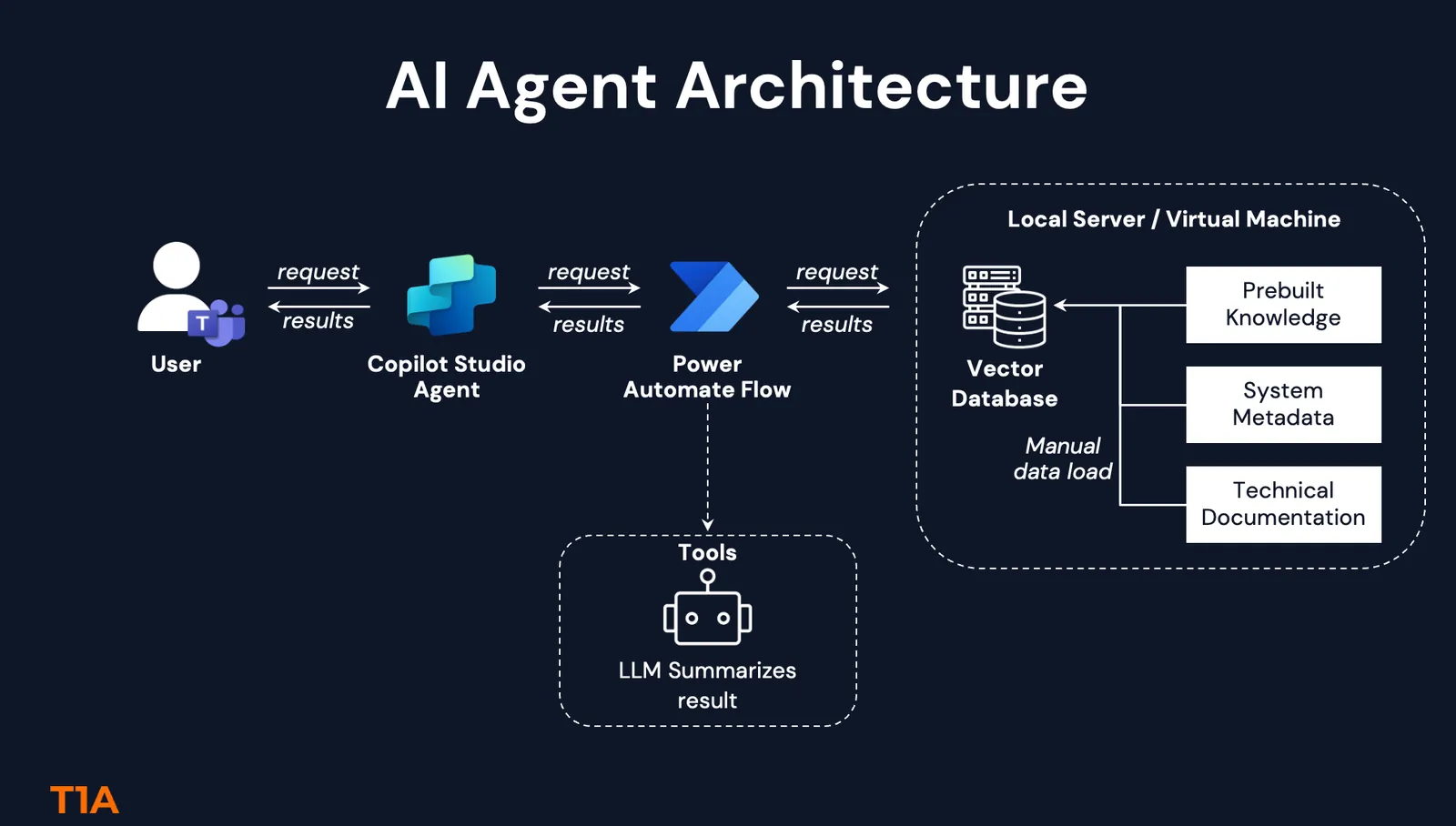
Layer 1: Prebuilt Knowledge Base
Standard system documentation – but not just copy-pasted vendor manuals. We've built this foundation based on standard documentation plus our team's experience and knowledge of common implementations. This layer represents curated expertise about how these systems typically work, table definitions, standard fields, and common relationships.
Layer 2: Production System Metadata
We extract the actual structure from your environment: the table names, fields, and relationships that exist in your production system. This layer captures what documentation often misses: your specific version, active tables, and data types as they actually exist.
Layer 3: Your Technical Documentation
Custom table descriptions, internal specs, workflow designs, architecture decision records. The institutional knowledge that usually lives in SharePoint folders nobody can find or in outdated Confluence pages.
The agent searches across all three simultaneously using a vector database (we used ChromaDB for the first version of Librarian). It understands context, not just keywords – so "approval workflow" connects to "authorization process" and "sign-off procedure" automatically.
Keeping Knowledge Fresh: We've designed update flows for Layers 2 and 3 – so when your system metadata changes or new documentation arrives, you can refresh the knowledge base easily. This is what makes Librarian practical for long-term use, not just a one-time setup.
Watch how the agent handles both standard SAP queries and custom table questions – and how adding documentation transforms incomplete answers into actionable insights.
The demo shows the basic use case, but the implications go deeper:
Cross-Module Analysis
"Show me how order-to-cash data flows across SD, FI, and MM modules" – the agent can trace connections across modules because it has the complete metadata graph.
Estimation & Scoping
"What data sources do we need for a procure-to-pay analysis?" – faster, more accurate project scoping for process analysts and consultants.
Knowledge Transfer
New team member joins? Introduce them to the Librarian. They can get up to speed much faster, without months of shadowing experts.
Here's something we don't talk about enough: the human cost of knowledge silos.
Your SAP expert who's been with the company for 15 years? She's answering the same questions repeatedly. She's in back-to-back meetings explaining table structures. She's the bottleneck on every project. And she's exhausted.
Librarian doesn't replace her expertise – it amplifies it. She documents her knowledge once (or we extract it automatically from her existing documentation), and it becomes accessible to the entire organization. She shifts from being a helpdesk to being an architect.
That's not automation replacing humans. That's automation freeing humans to do valuable work.
Let's be practical about what implementing Librarian requires:
Timeline & Setup:
What you DON'T need:
Changes to your production system, custom development, or extensive training. If your team uses Teams, they already know the interface.
While our demo features SAP Accounts Payable, this approach works across enterprise systems with similar characteristics: complex data structures, extensive customizations, and active use in analytics – like Oracle or Salesforce.
The solution is applicable to any system, no matter how complex, customized, or old the legacy landscape is. We're also planning to unite Librarians for different source systems – providing analysts with a single entry point and guidance about inter-system connections.
The pattern is universal: complex system + poor documentation + customization = knowledge gap. We're not building a "magic AI that knows everything." This is a well-shaped, specific use case – and that's exactly why it works. The bounded problem, structured knowledge sources, and clear success criteria make this a practical application of AI.
We're looking for pilot partners – organizations with complex SAP, Oracle, or Salesforce environments where data discovery is a known bottleneck.
If the demo video resonates with challenges you're facing, reach out to us – and we'll help you set up an agent like this in a matter of weeks.