A large European bank was stuck in the middle of a migration from SAS Marketing Automation (MA) to SAS Customer Intelligence 360 (CI360). Email was already live in CI360. Four other channels — SMS, Mobile App, Call Center, Branch — were still running on MA. Nobody had a clear answer for how to move them over. Most of the bank's customer communication was frozen in a legacy system while a brand-new platform sat half-idle next to it.
That's not an edge case. It's what a mid-migration usually looks like.
Migrating from SAS Marketing Automation to CI360 isn't a lift-and-shift — it's a move from a server-based solution to a cloud ecosystem, and the traps along the way are easy to underestimate. SAS has built real tooling to smooth the path: the Direct Marketing agent, an automated migration utility, native integration support. For a straightforward cloud setup, that tooling works well. But large enterprises are rarely straightforward.
After many of these projects — across banks, telecoms, and retailers — we've learned exactly where the real work hides. This article is about that.
SAS does provide a migration utility, and it's worth understanding exactly what it does before you plan a project timeline around it. The tool exports MA campaigns using the uploadCampaigns command-line utility, then lets you import them into CI360 as segment maps and direct marketing tasks. Two steps, one purpose: get your campaign logic out of MA and into CI360's data model without redrawing every diagram by hand.
That's the good news. The utility handles the mechanical conversion of Select nodes into Criteria nodes, Communication nodes into direct marketing tasks, and Process nodes into their CI360 equivalents. But "handles" doesn't mean "handles cleanly." Limitations pile up fast: unsupported node types, silent behavior changes, partial rule support, and more (see SAS's own documentation for the full list).
And then there's the part the utility doesn't even attempt: Custom Details, non-standard Post Processing, and any data import that falls outside the scope of your Information Map. Building or updating that Information Map, the piece that defines your subjects, relationships, and custom properties, is entirely on you, done manually before migration even starts.
So think of the utility as scaffolding, not a finished building. It gets segment maps and direct marketing tasks up fast, and it genuinely does save weeks of manual diagram-redrawing. But the real work, the part that determines whether your CI360 environment actually enables all integrations you had in MA, starts the moment the import finishes.
Which raises the obvious question: if the utility only gets you partway there, what does the rest of that "real work" actually look like?
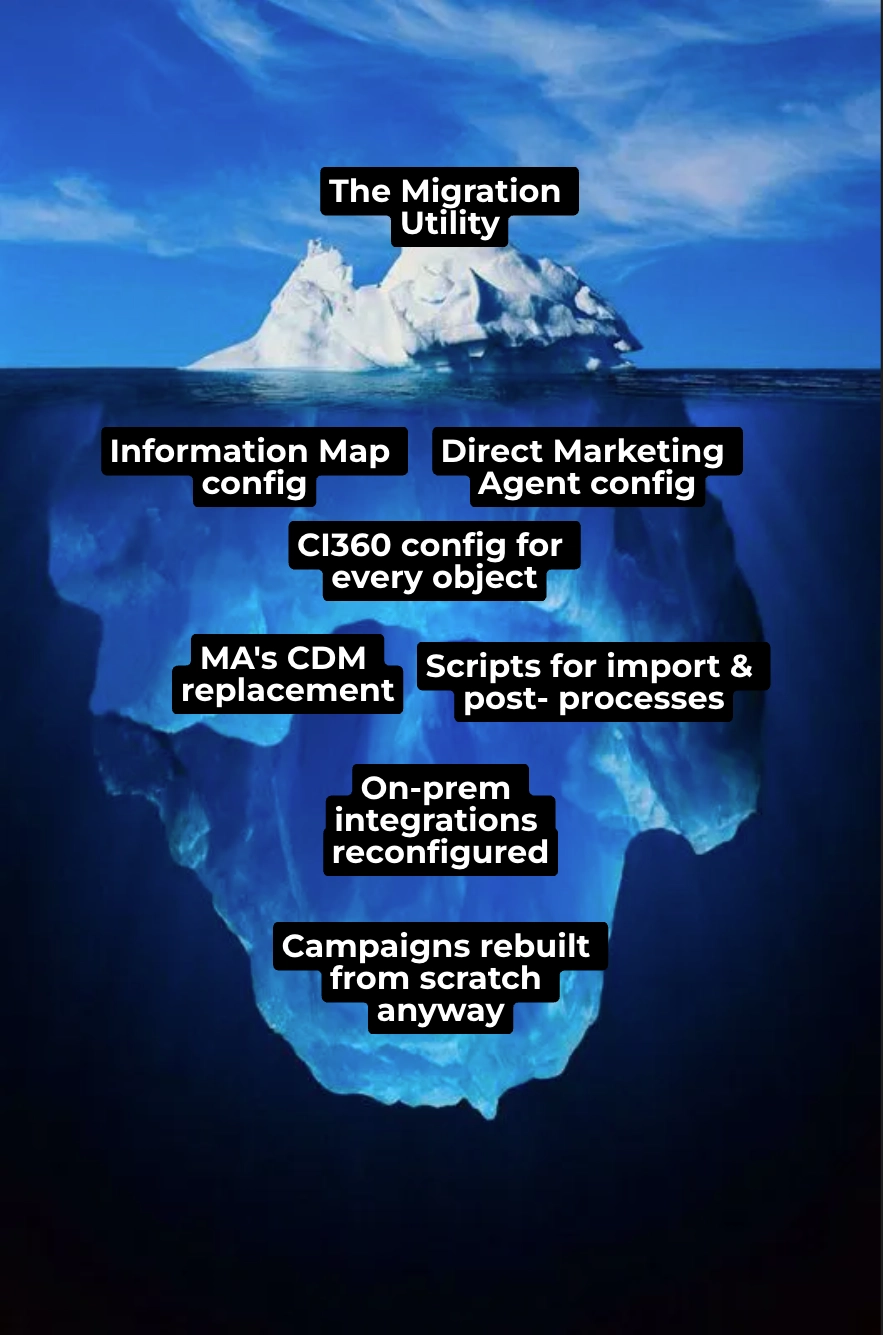
The utility covers the tip of the iceberg. Below the waterline, there's a lot more work, and most of it has to happen before you can even use the tool:
In most of our projects, we barely ended up using the migration utility at all. The original MA tasks were so heavily customized around specific integrations that rebuilding the campaigns from scratch and then reconfiguring each integration step was simply more practical than migrating and patching them afterward.
So no, the utility isn't a magic wand. Here are the five areas we now treat as the real pillars of any migration.
You can't start any cloud-to-on-premises integration without installing and configuring the Direct Marketing Agent first. It sounds like a straightforward, one-afternoon task. In practice, it's rarely that simple.
First, versioning matters: the agent for SAS 9.4 M5–M7 requires Java 8, M8 requires Java 11, M9 requires Java 21 — and upgrading SAS 9.4 means a fresh agent install, not an in-place update. There's also a hard deadline: starting 15 July 2026, agents on SAS 9.4M7 or older can no longer connect to the CI360 API gateway at all.
Then there's network and access. The agent needs an outgoing WebSocket connection that many corporate firewalls block by default, plus specific user permissions: SASServer1 login rights, SASUSERS group membership, metadata read/write, and database access. In enterprise IT, that's several separate approval tickets before you've touched a single campaign.
Once installed, the agent isn't "set and forget." Its metadata commands must run in strict sequence, and the whole thing depends on an Information Map that has to exist before the agent is useful — which itself requires a configured business context.
The Information Map itself can be the same as you used in MA. However, in most of the projects, we update it to get rid of legacy data items and to add an actual ones, or even rebuild it from scratch to make it more manageable.
Versioning, network approvals, access rights, correct sequencing, Information Map configuring: get one wrong, and a "few hours" install becomes a multi-week IT ticket chain.
To actually use that on-premises connection, you need to set up several cloud-side entities:
Get all four right, and CI360 becomes as flexible as MA used to be. Get any one wrong, and you'll feel it downstream — which is exactly where the next problem shows up.
MA comes with a native on-premises database, and in most real deployments, that database quietly became the backbone for reporting and integrations well beyond marketing. CI360 doesn't give you that for free.
To preserve data access, you need to build a custom database to hold whatever cloud data must remain available locally. That means scheduling regular UDM downloads and configuring additional exports just to keep that custom database fed.
One detail is especially easy to miss if your existing communication channels use CDM attributes directly. In MA, many of those attribute IDs are numeric. In CI360, cloud-side attributes are UUID-based. If downstream systems, channel integrations, or reporting logic depend on those IDs, you need to design the one-to-one ID generation and mapping process very carefully. The mapping has to stay consistent between CI360, the replacement local database, and every integrated system that consumes the data. Otherwise, the migration can look successful in the cloud while silently breaking attribution, reporting, or channel execution downstream.
Out of the box, Direct Marketing Tasks just save exported data to an on-premises database for customers in the selected segments. No transformation, no validation, nothing fancy.
Real-world migrations rarely stay that simple. You'll need to validate inputs, split single fields into multiple columns to feed downstream integrations, or trigger another task mid-process. Every one of these requires a custom Post Process script.
You'll likely also need to push local segments back into CI360 — a global control group table is a common example — and that's another script, another piece of custom development that isn't in any migration utility.
None of these scripts are individually complex. But they're consistently required for any enterprise-grade integration, and none of them show up in the "automated migration" pitch.
MA's integrations feed data to delivery systems, reporting tools, CRM platforms, and everywhere else the business depends on customer data. They rely on on-premises scripts and the CDM's storage structure to do it. CI360 has no on-premises footprint beyond the Direct Agent itself, which means every one of those integrations has to be updated or rebuilt manually.
We already covered CDM replacement above, but the integration scripts themselves take their own chunk of time. In the best case, that's just repointing a connection string to a new source database. In the worst case, it's rebuilding the integration logic entirely to handle a new data structure at the source.
Either way, "migration" ends up meaning something closer to "re-engineering", one integration at a time.
Migration doesn't have to stop at rebuilding the same on-premises integrations you had in MA. In most cases, it's worth partially migrating channels onto CI360's native rails instead, which frees you to use CI360 more fully and gives you access to the newest features SAS ships.
Email is the clearest example: CI360 lets you save email parts as creatives, build the final email body in a drag-and-drop editor, and personalize using Information Map or Data Hub data items, among other features.
On-premises integration is more flexible, but it comes with an ongoing maintenance cost. Before migrating, it's worth deciding, channel by channel, whether to rebuild the on-premises integration or move to native.
Information Map update deserve its own scope. Even migrating it as-is from MA, issues like network connectivity or source database access will cost you a day or two. Update the Map, and generation issues can add a week on top of the design time itself.
Analysis of native channel opportunities is worth the time. Sometimes it's better to spend an extra six months agreeing on a cloud-native integration with your security team than to migrate a ten-year-old, undocumented legacy integration with a third-party delivery system.
Budget for the conversation, not just the code. On-prem migrations touch every team: IT, marketing operations, channel owners, security. The projects that ran smoothest were the ones where we had early access to all stakeholders, not just the technical lead. On those projects, we spent roughly 20% of project time just talking to each team, surfacing the pain points that had to make it into scope.
Treat Direct Marketing Agent versioning as an ongoing constraint, not a one-time install step. Because the agent install looks like a small task, it's easy to schedule late in the project plan and forget once it's done. But the agent version is tied to your SAS 9.4 maintenance level, and every agent connected to a given access point has to stay on the same version — so any future SAS upgrade means a fresh agent install, not an in-place update. Confirm agent compatibility in week one, and revisit it every time SAS 9.4 gets patched. (Small but useful note: the 15 July 2026 cutoff for SAS 9.4 M7 and older agents is a good forcing function to check this now if you haven't already.)
The bank's deployment eventually went live: fully operational, all five integrations running, campaigns reaching customers across SMS, call centre, and branch. CI360 is a modern platform, and it handles on-prem data well. But it needs to be set up for it: the data layer, the Information Map, the integrations, the Post Processes. None of that is automatic, and none of it is trivial. Get it right, though, and the result is a platform genuinely more capable than what it replaced.
If your organization is planning a move from SAS Marketing Automation to CI360, or is mid-migration and hitting walls, we'd be glad to compare notes. Reach out to the T1A team.